


Zoya - Halal Investing App
4.7192.00 Reviews
App Specs
- Version
- 2.0.61
- Updated On
- License
- Free
- Downloads
- 100,000+
- Developer
- Investroo Inc.
- Categories
- Finance
- Platform
- Android
Screenshots
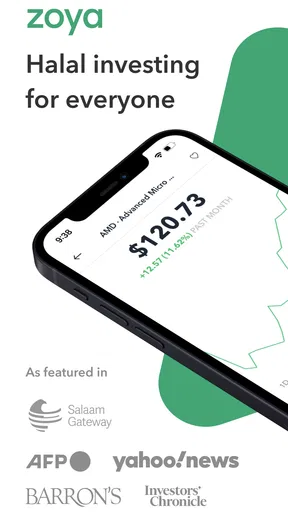
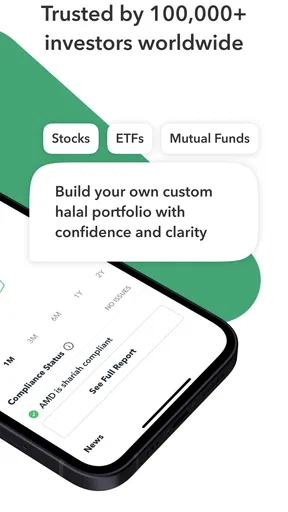
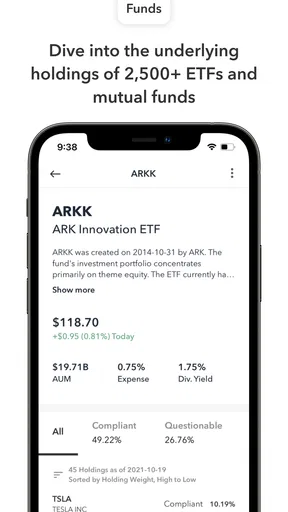
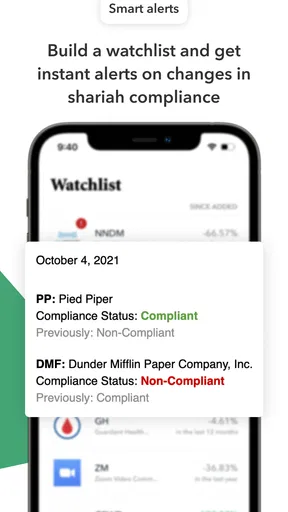
 Analysis by AppCompare
I think Zoya - Halal Investing App is most useful when you have reached the point of asking not just “What might I invest in?” but also “Does this holding fit the standards I care about?” That question can make ordinary stock research feel fragmented: you may be checking a company’s business, looking up financial details, and trying to understand Islamic screening separately. Zoya brings the halal-investing part of that process into one finance app, while leaving the actual investment decisions in your hands.
That distinction matters. I would treat it as a research and portfolio companion, not as a shortcut to choosing stocks or a promise of returns. Its screening and tracking tools can help you organize a values-based investing routine, but they do not remove the need to understand risk, decide whether an investment suits your circumstances, or follow the standards you personally rely on.
A useful starting point for values-led research
For someone who already invests, or is learning how to, the first practical question is usually whether a company deserves a closer look. Zoya is built around identifying stocks and ETFs that meet halal criteria, so it gives that question a clearer place in the research process than a general-purpose brokerage app usually does. Investroo Inc. develops the app, and its focus is narrower than a standard financial dashboard: the point is to make Shariah-conscious screening part of the way you assess investments.
That focus will not suit everyone. If you want an app that selects a portfolio for you, executes trades, or replaces learning the basics of investing, this is not the role I would expect Zoya to fill. I would also skip it if halal compliance is not relevant to how you invest and you only want broad market charts or trading tools. Its value is strongest when the screening question is genuinely part of your decision-making.
From a company search to a considered choice
My preferred way to use the workflow is to begin with a company or fund I already want to understand, then use Zoya to check its compliance status before I move on to wider research. That order is helpful because a screening result is a starting signal, not a complete investment case. I would still ask what the business does, how it fits my goals, and how much exposure I want to a particular company or sector.
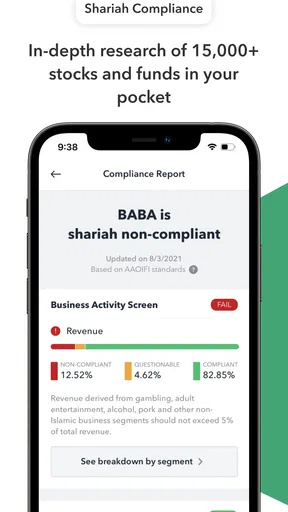
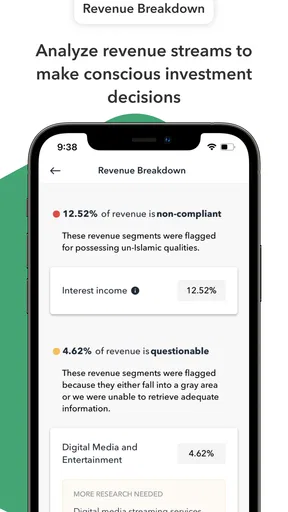
The app’s screening considers areas such as revenue sources and debt ratios. Those checks make the process more structured than relying on a company’s name or reputation alone, but I would not confuse a status indicator with a permanent guarantee. Company finances and business activities can change. A sensible habit is to revisit holdings and watchlist names rather than treating a result from one search as a decision that never needs checking again.
Keeping a portfolio and watchlist in perspective
Portfolio tracking helps turn isolated searches into a view of what you already own. You can add investments and follow their performance over time, which is useful if your holdings are spread across accounts or if you want a single place to review your halal investments. I would use that overview for awareness and record-keeping, not as a substitute for the official figures and statements from the service where each investment is held.
Worth Reading Before You Choose

EA SPORTS FC Mobile 26 Is a Bigger Football Game, but It Takes Time

Flipboard Shows What News Apps Must Do Beyond the Feed

Switching to Android Auto Means Rethinking Your Driving Routine

Google Calendar Makes a Crowded Week Easier to Manage

Ludo King Makes the Most of the Minutes Between Plans

Baby Panda World Brings Quick Play to Modern Phones, but Its Game Library Feels Busy
The watchlist is more useful when I keep it selective. Rather than saving every interesting ticker, I would add only companies or funds I am genuinely researching, then check them again when I have a reason to act. Zoya can also surface compliance changes for watched stocks, which gives you a prompt to review a holding or candidate. The practical trade-off is that alerts and status updates still require judgment: they tell you something has changed, not what you should do next.
One everyday example is a monthly review after payday. I could check the investments I already hold, see whether any watched companies need another look, and then decide whether there is anything worth researching before making a contribution elsewhere. That creates a calm checkpoint instead of reacting to every market move. I would avoid making the review an automatic buy routine; a convenient schedule is not evidence that a stock is suitable at that moment.
Where it fits among investing tools
Compared with a typical brokerage app, Zoya puts halal screening closer to the center of the experience, while brokerages tend to focus on account balances, orders, and trading. Compared with general market-research tools, its distinctive use is checking investments through an Islamic-finance lens rather than simply sorting companies by conventional financial measures. That makes it a useful companion for research, though it is not a replacement for a broker or for independent analysis.
The best handoff is straightforward: use Zoya to research compliance and keep an eye on a portfolio, then use the appropriate investing service for account-specific information and any transaction you choose to make. Keeping those roles separate helps avoid assuming that a tracker is the authoritative record of a brokerage account. It also encourages a healthier pause between discovering a stock and committing money to it.
Getting Started with Zoya
First things first, downloading and setting up Zoya was a breeze. Available for both Android and iOS, you can find it on the Google Play Store or Apple App Store. Once installed, the onboarding process is smooth and user-friendly. You're guided through creating an account, which took me just a couple of minutes.
One of the standout features right off the bat is its clean and intuitive interface. The app is designed to make navigation easy, even if you're not a tech whiz. Everything is laid out logically, and the design is aesthetically pleasing without being overwhelming. It's clear that a lot of thought has gone into making the user experience as seamless as possible.
What Makes Zoya Unique?
Now, let's talk about what sets Zoya apart. The app focuses on helping you invest in a way that's compliant with Islamic principles. It provides a comprehensive list of halal stocks, which is a huge plus if you're looking to invest ethically. You can easily search for stocks and check their compliance status with Islamic finance guidelines.
Zoya's screening process is detailed. Stocks are analyzed based on revenue sources, debt ratios, and other financial metrics to ensure compliance. This feature gives you peace of mind, knowing that your investments align with your values. It's like having a little ethical guide sitting right in your pocket.
Exploring the Features
Aside from stock screening, Zoya offers other nifty features. One that caught my eye is the portfolio tracking tool. You can add your investments and keep track of their performance over time. This is super handy if you want to see how your halal investments stack up.
Another cool feature is the watchlist. You can mark stocks that interest you and get updates on their compliance status or any major changes. It’s a neat way to stay informed without having to constantly check in on each stock individually.
"Zoya is like having your own personal investment assistant, guiding you through the halal investment landscape."
Community and Support
Investing can sometimes feel a bit lonely, especially if you're navigating specific criteria like halal compliance. Zoya bridges this gap with a community feature that allows you to connect with other like-minded investors. It's a supportive environment where you can share insights, tips, or even just chat about your investment journey.
And if you ever hit a snag, Zoya's support team is just a tap away. They offer quick and helpful responses, making sure you're never left in the lurch. It's clear they care about user satisfaction and are committed to providing a top-notch experience.
Final Thoughts
Overall, my experience with Zoya - Halal Investing App was incredibly positive. It's not just an app; it's a tool that empowers you to invest ethically without sacrificing ease of use or functionality. Whether you're a seasoned investor or just starting out, Zoya offers valuable resources and a supportive community to help you along the way.
If you're keen on aligning your investments with your values, I'd say give Zoya a shot. It's a game-changer in the world of halal investing and might just be the perfect addition to your financial toolkit. Happy investing!
Practical details before you begin
Zoya is free to download, with in-app purchases listed from $4.99 to $119.99 per item. I would check which tools are included at no cost and which, if any, require a purchase before building a routine around a particular feature. That is especially worthwhile if you mainly want occasional screening; someone who expects to use portfolio tools regularly may weigh the available options differently.
The app is rated for Everyone, has a 4.7 average from around 2,500 ratings, and has passed 100,000 installs. Those figures suggest that it has found an audience, but they cannot tell you whether its screening approach matches your own expectations. I would use the rating as a broad signal of user reception, not as evidence that every investor will find the same workflow or conclusions useful.
It was released on April 30, 2020, and version 2.0.58 is the current version. It requires Android 8.0 or later. If you use an older Android device, check compatibility before planning to make it part of your regular research; on iOS, the app is also available through the Apple App Store.
Small habits that make the workflow more useful
A non-obvious benefit of keeping a watchlist modest is that it turns changes into a manageable review queue. If you save a long list of companies you have no intention of researching, updates can become noise. I would group my attention around a few candidates and revisit them when a real decision is approaching, rather than treating every status change as an urgent instruction.
I would also separate the “is it screened as compliant?” question from “is this a good investment for me?” The first is where Zoya is most directly helpful; the second still calls for thinking about diversification, time horizon, risk tolerance, and the role a holding would play in a portfolio. A company can pass a screen and still be a poor personal fit because its price, concentration, or business risks do not match your plan.
For a household making decisions together, the app can serve as a shared reference point during a conversation: one person can bring a company to the table, and both can review its screening and discuss the broader investment case before taking any action. That is more constructive than using a single status result to end the discussion. It also makes clear where another source of financial or religious guidance may be appropriate for a person’s circumstances.
Who is likely to appreciate it—and who may not
I would recommend trying Zoya if you want Islamic screening to be part of your stock research and you are comfortable making the final decisions yourself. It is especially relevant to investors who already have a brokerage account, want a more organized way to inspect potential holdings, or need a simple routine for reviewing a watchlist alongside existing investments.
It is less suitable if you expect a hands-off portfolio, live trade execution, or a substitute for financial advice. It may also frustrate people who want one app to serve as the definitive record for every account: portfolio tracking is convenient, but I would still verify balances and transactions with the financial institution that holds the assets. And if you follow a particular scholar or screening methodology, it is sensible to compare the app’s approach with the guidance you trust rather than assuming every interpretation is identical.
My overall view is that Zoya works best as a focused checkpoint between curiosity and action. It gives halal-conscious investors a more direct way to screen and monitor stocks, while its limits are easiest to manage when you keep a broker, independent research, and your own principles in the loop. If that division of roles sounds right for you, the app can make a values-led investing routine clearer without pretending to make the decision on your behalf.
Pros
- User-friendly interface for easy navigation.
- Real-time market updates and insights.
- Strict adherence to Shariah principles.
- Educational resources for beginner investors.
- Secure transactions with strong data encryption.
Cons
- Limited to specific financial markets.
- Occasional delays in customer support response.
- Requires stable internet connection.
- No offline mode for market data.
- Subscription fee for premium features.
FAQs for Zoya - Halal Investing App
What is Zoya and how does it ensure Halal investing?
Zoya is an investment app designed for Muslims seeking to invest in compliance with Shariah law. It screens stocks and ETFs to ensure they meet Islamic ethical standards, focusing on avoiding businesses related to alcohol, gambling, and interest-bearing financial services. This ensures that all investments align with Islamic principles.
Is Zoya available on both Android and iOS devices?
Yes, Zoya is available for download on both Android and iOS platforms. You can find the app on the Google Play Store and the Apple App Store, making it accessible to a wide range of users who are interested in ethical investing through their smartphones.
Are there any fees associated with using the Zoya app?
Zoya offers a freemium model, where basic features are available for free, but advanced features may require a subscription. These premium features often include enhanced stock screening and detailed financial insights. It's advisable to review the app's pricing details to understand any costs involved.
How user-friendly is the Zoya app for beginners in investing?
Zoya is designed with user-friendliness in mind, providing a clean interface and intuitive navigation. It includes educational resources to help beginners understand Halal investing principles. The app guides users through the investment process, making it accessible for those new to ethical investing.
What kind of customer support does Zoya offer?
Zoya provides robust customer support, including a comprehensive FAQ section within the app and on their website. Users can contact support through email or in-app messaging for personalized assistance. The team is dedicated to helping users with any queries regarding Halal investing or app functionality.


